Building ReqRes from scratch: LeetCode-style platform for Express.js
Learning Express.js has plenty of tutorials. There are articles, videos, documentation, and more CRUD projects than I would like to admit. But there wasn't really a place that felt like a dedicated practice platform for Express.js in the same way that LeetCode feels like a practice platform for DSA.
You have probably come across platforms like LeetCode, CodeSandbox, or Replit that let you write and run code without setting up everything locally. At some point while learning Express.js, I started wondering:
What would it actually take to build something like that myself?
That was the starting point for ReqRes.
The idea was simple: build a LeetCode-style platform where developers could practice real-world Express.js concepts by writing APIs, middleware, authentication flows, and other backend components directly in the browser, then get instant feedback from automated tests.
Little did I know, The idea was simple. The implementation was not.
What started as "let users write Express code and run it" eventually turned into a system with a Next.js frontend, an Express API, PostgreSQL, Redis, BullMQ, a separate worker, a Docker-based execution service, an SSE stream, authentication, rate limiting, gamification, metrics, and a collection of bugs that taught me more than most of the features did.
This post is a walkthrough of that journey.
I won't try to explain every technology I used from scratch. Instead, I'll focus more on why I reached for each piece, what problem it solved, what I got wrong, and what I would probably do differently today.
The Idea
The idea for ReqRes came from my own experience learning Express.js.
I could follow a tutorial and build an API. I could read the Express documentation. I could build another authentication system or CRUD application.
But there was a gap between:
"I understand how this works." & "Give me a problem and let me build it from scratch."
That gap is exactly what I wanted ReqRes to fill. Instead of asking someone to build another complete project, I wanted the platform to give them smaller, focused backend problems:
- create a route
- parse request parameters
- build middleware
- handle errors
- implement authentication
- configure CORS
- build a rate limiter
- work with a database
- and eventually move into more difficult backend problems
The current version of ReqRes organizes these into tracks such as Routing, Middleware, Security, and Database, with difficulty ranging from Easy to Hard.
The goal was never to replace a real project. It was to make practicing the smaller pieces of backend development much easier.
The first version of the idea
In my head, the first version was almost comically simple:
User writes code ➔ API ➔ Run the code ➔ Return the result
At that point I had not really considered the most important question: Where exactly do I run someone else's code?
And more importantly: What happens when that code is bad?
"How do I safely run user code?"
This was probably the first big engineering problem I had to take seriously. If a user can submit arbitrary JavaScript, I can't simply execute it inside the same process as my API.
Imagine someone submitting code that:
- never terminates
- consumes a lot of memory
- tries to access the filesystem
- starts a huge number of processes
- makes network requests
- crashes the process
- or simply takes much longer than expected
Even though ReqRes is a learning project, the basic trust boundary is very real:
The user's code cannot be trusted simply because it is code. It could be malicious, buggy, or just poorly written. The system needs to be designed around that assumption.
That's why Docker became a core part of the project rather than just another item in the tech stack. I wanted each execution to happen inside a short-lived environment that I could control and destroy afterwards.
So, the architecture started moving towards:
Browser ➔ API ➔ Runner ➔ Docker container ➔ Tests ➔ Result
This was the first major architectural decision. And it immediately created another problem.
If every submission goes through Docker, what happens when ten, fifty, or a hundred submissions arrive at roughly the same time?
I didn't want the API process sitting there waiting for all of them. That led to the next part of the architecture.
The Architecute I ended up with
The architecture eventually became a set of separate responsibilities rather than one application doing everything. At a high level, this is what ReqRes looks like today:
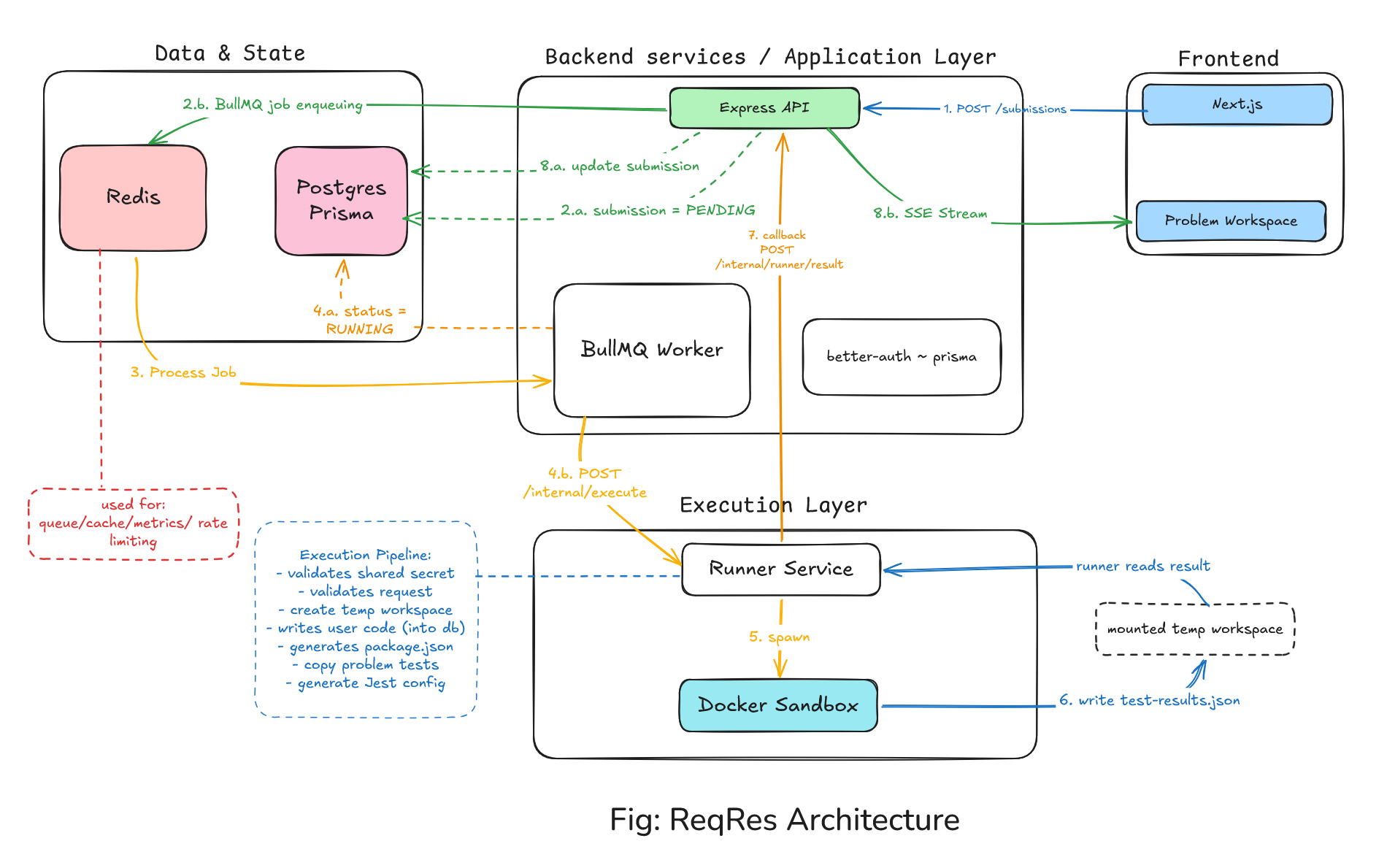
The current repository describes the same overall flow: the web app sends submissions to the API, the API persists and queues them, a worker sends them to the Runner, the Runner executes the code in an ephemeral Docker container, and the result comes back through the API before being streamed to the browser.
The important thing here is not the number of boxes.
It's the boundaries between the boxes.
- The API handles application-level work.
- Redis/BullMQ handles the queue.
- The worker handles background execution orchestration.
- The Runner handles code execution.
- Docker provides the isolation boundary.
- PostgreSQL stores durable application state.
- And the browser only needs to care about the experience of writing code and getting a result.
Why a monorepo?
I built the project as a Turborepo/Bun monorepo. The structure is roughly:
reqres/
├── apps/
│ ├── api/
│ ├── runner/
│ └── web/
│
├── packages/
│ ├── database/
│ ├── types/
│ ├── utils/
│ ├── eslint-config/
│ └── typescript-config/
│
├── docker/
├── docker-compose.yml
└── turbo.json
The apps directory contains the deployable parts of the system, while packages contains shared code and configuration.
I picked monorepo because once the API, Runner, frontend, shared types, database package, and Docker setup all existed, keeping them together made local development much easier.
For a project where I was constantly changing both the API and the execution service at the same time, being able to make one change and immediately run the whole system was useful.
What actually happens when user clicks "Run"?
This is probably the most important part of the architecture. Let's follow one submission from the browser all the way to the Docker container.
Step 1: The browser sends the submission
The user writes code in the Monaco editor and clicks Run or Submit. The frontend sends the code bundle to the API. The current API creates a submission record and then adds a job to BullMQ.
Conceptually:
Browser
   │
   │ POST /submissions
   ▼
Express API
   │
   ├──────────────► PostgreSQL
   │                create submission
   │                status = PENDING
   │
   └──────────────► Redis / BullMQ
                      enqueue job


(It might seem cheap to use such textual tree diagram, but I didn't want to attach images at every node so you will find many such tree diagrams below wherever i felt the need.)
At first glance, it would be tempting to just call the Runner immediately. And that was roughly how I thought about the problem in the beginning. But there is a major problem with doing that.
Step 2: Why I needed a queue
Imagine the API receives 20 submissions. If every request directly executes code and waits for the result, the API becomes responsible for:
request ➔ wait ➔ Docker ➔ Jest ➔ wait ➔ result ➔ response
That makes the HTTP request responsible for a piece of work that can be relatively expensive and unpredictable.
That is where BullMQ came in.
The API puts a job into Redis-backed BullMQ, and a worker consumes it later. BullMQ is designed around this queue/worker model, and multiple workers can consume jobs from the same queue.
So the flow becomes:
HTTP request ➔ save submission ➔ queue job ➔ return
Then separately:
queue ➔ worker ➔ runner ➔ docker
That small change ended up becoming one of the most important architectural decisions in the project. It gave me a separation between request handling and code execution.
It also means that if execution becomes more expensive later, I can increase the number of workers without turning the API into a giant execution process.
In production, the repository supports running the worker as a separate process rather than embedding it inside the API. During development, the API runs an embedded worker by default because it makes local setup simpler.
That was a good compromise for me.
The Worker
Once the job is in the queue, the Worker picks it up. The Worker is not actually executing the user's JavaScript itself. Its job is more like an orchestrator:
Get job
   ↓
mark submission RUNNING
   ↓
call Runner
   ↓
wait for result
   ↓
save result
   ↓
update submission state
The important distinction here is: Worker ≠ Sandbox
The Worker manages the process. The Runner actually executes the code.
That separation became useful because the Worker deals with application state and job lifecycle, while the Runner can stay focused on the much more sensitive execution problem.
BullMQ also gives me useful behavior around failed jobs and retries. Failed jobs can be retried with backoff rather than immediately giving up.
I used retries primarily around failures where retrying makes sense, rather than blindly retrying every execution error. A user's code being wrong is not a transient infrastructure failure. A Runner being temporarily unreachable is a different story. That distinction is important.
The Docker rabbit hole
This is probably the section where ReqRes became much more complicated than I expected. The basic idea sounds straightforward:
Runner
  ↓
create Docker container
  ↓
copy user code
  ↓
run tests
  ↓
read results
  ↓
delete container
But there are quite a few details hiding inside that pipeline.
What happens inside the Runner?
The Runner receives the execution request and prepares a temporary workspace. The rough sequence is:
Execution request
      ↓
Validate request
      ↓
Create temporary workspace
      ↓
Write user files
      ↓
Prepare tests
      ↓
Prepare Jest configuration
      ↓
Spawn Docker container
      ↓
Run tests
      ↓
Read test results
      ↓
Parse + sanitize results
      ↓
Callback to API
      ↓
Cleanup
This is where I learned that "running code in Docker" is only the outer layer. The real work is everything you have to do before and after the container runs. The Runner currently uses Jest and Supertest to execute and test the submitted Express application.
Why Supertest?
One thing I liked about this setup was that I didn't need the user's Express app to actually start listening on a network port for every test.
The tests can import the app and exercise it directly through Supertest. For example, a problem can effectively do:
require user's Express app ➔ Supertest ➔ GET /some-endpoint ➔ assert response
That made the problems feel much closer to how you might test a normal Express application.
Making the Sandbox less dangerous
Once arbitrary code is running, isolation becomes important. The current Runner setup uses multiple restrictions around the Docker container, including:
- no network access
- read-only filesystem settings
- memory and CPU limits
- ephemeral execution
- a shared secret between API and Runner
- timeouts and cleanup
Currently there is a 512 MB memory limit and 1.5 CPU limit for the execution container, along with network and filesystem restrictions.
I don't want to describe this as some magical "secure code execution" system because it isn't. This is a project I built as a learning exercise, not a hardened multi-tenant execution platform. What I did build was a layered set of restrictions that makes it much harder for a submission to directly interfere with the rest of the application.
If I were building this as a real public service at much larger scale, I would want a much deeper security review around the entire execution boundary. Docker's own security documentation is a good reference for understanding why container isolation, reduced privileges, filesystem controls, and capability restrictions matter.
Docker Engine security documentation
The performance problem I didn't expect
I had a working sandbox. It was just slower than I wanted. The reason was simple: the first approach involved doing too much setup for every execution, especially around dependencies.
If every container has to prepare the entire Node environment from scratch, even a tiny Express problem becomes unnecessarily expensive. So I moved towards:
Prebuilt runner image
    ↓
dependencies already available
    ↓
submission-specific files
    ↓
run tests
The repository currently builds a reusable runner base image containing the execution environment, which is then used to make individual executions faster. This was one of those optimizations that didn't come from a benchmark-heavy performance engineering process. It came from running the app and thinking:
"Why does clicking Run feel like I'm rebuilding the environment every time?"
That is one of the things I like about side projects. You often don't discover performance problems through a dashboard. You discover them because you get annoyed while using your own application.
Getting results back to the browser
Now the system had another problem. The browser starts the submission. The Worker handles it. The Runner executes it. The Docker container finishes. The API stores the result. At this point, the browser still needs to know what happened.
I could have used polling. That works.
But it felt awkward for a feature whose main purpose is to show progress while execution is happening. So I used Server-Sent Events. The flow becomes:
Browser
   │
   │ open SSE connection
   ▼
API
   │
   ├── queued
   ├── running
   ├── test result
   └── complete
         ↓
      Browser
SSE is a one-way server → browser stream, which fit this particular problem nicely: the browser sends the submission normally, while the server can push execution updates back to the browser.
The API exposes a submission stream endpoint, and the browser keeps that connection open while the submission progresses.
Why not websockets?
Because I didn't really need two-way real-time communication. The browser wasn't continuously sending data to the server through the realtime channel. It mainly needed:
"Tell me when something changes."
SSE was simpler for that requirement. Could WebSockets have worked? Absolutely.
Would I automatically choose WebSockets today just because they are more common in realtime systems? Probably not.
This was one of the cases where choosing the smaller tool for the problem made more sense.
The SSE Problem in production
Of course, getting the feature working locally wasn't the end of it. One of the frustrating things about streaming features is that, localhost can tell you lies.
The SSE stream could behave perfectly during local development and then behave differently once there were proxies or production infrastructure in between.
Buffering and connection handling became things I had to think about. That led me to things like:
- response headers
- cache control
- keeping the stream alive
- making sure intermediaries did not buffer events unnecessarily
This was a good lesson for me. If you are working with SSE yourself, MDN's guide is a good starting point because it covers the event stream format, browser connection handling, and error behavior.
The Neon connection pool mystery
This was one of my favorite bugs because I initially suspected the wrong thing. I was testing rate limiting and started seeing failures under concurrent activity. My first instinct was basically:
"The rate limiter is breaking."
But the rate limiter was not really the root cause. The actual problem involved a mismatch between the database schema expected by one part of the application and the schema being used elsewhere.
The problem became visible more clearly under concurrent database activity, which made the symptom look like a connection or rate-limit issue.
The lesson for me was simple ~ The component where the error appears is not necessarily the component causing the error. That sounds obvious now. It wasn't nearly as obvious while staring at a failing request.
You can have:
Request ➔ Middleware ➔ Auth ➔ Database ➔ Redis
and an error at the end of that chain might have been caused by something much earlier. That's why logs and request context started becoming much more important later in the project.
Run vs Submit
I also didn't want every click on Run to feel like a serious submission. When you're experimenting with code, you usually want feedback quickly. So ReqRes separates the two ideas.
Run ~ A smaller test set intended for quick feedback. Submit ~ The full test suite and scoring flow.
This ended up being a small product decision with a technical consequence. Because I had already built an asynchronous execution system, it became relatively natural to run both modes through the same execution pipeline while changing which tests and scoring logic were applied.
That was another lesson for me: Good infrastructure sometimes makes later product decisions easier.
Adding the gamification layer
At this point I had something technically useful, but I wanted it to have a bit more of the feel of a practice platform. That's where XP, streaks, leaderboard, and the activity grid came in.
The current project uses difficulty-based XP, first-try bonuses, daily streaks, a global leaderboard, and a GitHub-style activity grid on the profile. The XP system itself isn't particularly complex. The interesting part was everything around it. For example:
submission ➔ did it pass? ➔ first attempt? ➔ calculate XP ➔ update user stats
This looks like a simple number on the profile, but was a small state-management problem once multiple requests can happen at the same time.
Streaks taught me about timezones
A daily streak seems like one of the easiest features to build. Something like:
today - yesterday = streak continues
Except...
- What is "today"?
- Server time?
- UTC?
- The user's local time?
Those are not always the same.
If someone submits something at 11:30 PM in India and the server is already on the next UTC date, using a raw server date could produce the wrong result. So the streak logic needed to be based on the user's own timezone rather than pretending everyone lives in the server's timezone.
This was a small feature that taught me a much bigger lesson about handling Dates properly. Also, That same rule applies to calendars, reminders, analytics, billing periods, activity feeds, and basically everything else involving time.
Activity grid and Redis caching
The GitHub-style activity grid was another feature where I started thinking more about read patterns. The data basically comes from submission activity:
submissions ➔ group by day ➔ activity counts ➔ grid
But this is exactly the kind of data that gets read much more often than it changes.
So Redis became useful again as a cache.Instead of reconstructing the entire activity grid from PostgreSQL on every profile visit, I could cache the calculated result and invalidate it when relevant activity changed.
This was one of the first times where I started thinking less in terms of:
"Where do I store this?" and more in terms of**: "How often is this read, how often does it change, and where does it make sense to calculate it?"**
I found that change in thinking much valuable.
Building the workspace
Everything we've talked about so far mostly happens behind the scenes. The user sees a much simpler thing:
alt: problem workspace snapshot
The workspace uses Monaco for editing, problem content on one side, code files on the other, and a terminal-like output panel for execution results. The frontend itself wasn't where most of the system complexity lived, but there was an important design goal ~ The infrastructure should feel invisible.
A user shouldn't care that their code was:
queued
→ stored
→ processed by a worker
→ sent to another service
→ placed in Docker
→ tested
→ parsed
→ sent back
→ streamed through SSE
They should just see:
Running... ➔ Testing... ➔ ✓ 8 tests passed
That is the UX abstraction the whole architecture is trying to provide.
Security beyond Docker
The Docker sandbox is the most obvious security boundary, but it isn't the only one. There are several layers:
Browser
   ↓
Authentication
   ↓
Authorization
   ↓
Input validation
   ↓
Rate limiting
   ↓
API ↔ Runner authentication
   ↓
Docker isolation
   ↓
Execution restrictions
The API uses Zod validation, the Runner/API communication uses a shared secret, and the execution container has resource/network/filesystem restrictions.
One thing I became more careful about while building this was how I think about "security." because for a project that executes arbitrary user code, security layer is one of the crucial one.
Introducing Observability
Once a system has multiple moving pieces, logs become much more important. Suppose a submission is stuck. Where do you look?
Frontend? API? Postgres? Redis? Worker? Runner? Docker? Callback? SSE?
This is where observability started becoming useful. ReqRes uses Pino structured logging and Sentry for error tracking, and the project also has metrics around queue and application activity.
I also started thinking about correlation IDs. The idea is simple: requestId = abc123
Then the same identifier can travel through: Browser, API, Queue, Worker, Runner and Callback.
That sounds like a small implementation detail, but this was another point where the project started teaching me things I simply hadn't had to think about in smaller applications.
Deployment: Quite a challenge
Locally, ReqRes is relatively simple to run:
Next.js Express API Redis PostgreSQL Runner Docker
The repository includes Docker Compose support for Redis and the optional standalone worker, while the local development command starts the API, Runner, and Web applications together.
In a more production-like setup, the Worker can be separated from the API. That separation matters because the workload characteristics are different.
- The API should mostly be handling requests.
- The Worker can spend its time waiting for and coordinating expensive execution jobs.
- And the Runner can focus on the code execution environment.
The current repository explicitly supports this standalone worker mode for production-style deployment.
I have deployed the frontend layer of the application on Vercel, API and Worker on Railway, and Runner on GCP (because GCP was the cheapest option for me.)
At the time of writing, the hosted deployment is paused because of server cost, so the current repository also serves as the easiest way to understand and run the project locally. Initially when I started the project, it was very ambitious for me cause I built it thinking of real users using it in daily basis. For the same, I had also bought a dedicated domain for it, but later server costs caused the prod to be paused atm.
What I'd do differently today?
Looking back at ReqRes, there are quite a few things I would approach differently. Not because the current implementation is useless. Mostly because I understand the problem better now.
I would define the execution boundary earlier ~ The code execution problem is the heart of the product. If I were starting again, I'd design the Runner/API boundary almost immediately instead of first treating execution as just another backend feature.
I would write more integration tests earlier ~ A project with API → Redis → Worker → Runner → Docker has a lot of moving parts. Unit tests are useful, but there is a point where you need confidence that:
submit ➔ queue ➔ worker ➔ runner ➔ result
still works end to end. I would establish that kind of testing earlier.
I would design observability alongside the architecture ~ Adding logs and debugging context after something breaks works. Having the request/job identity available from the beginning is better.
Lessons Learned
The biggest thing I learned isn't really about Docker, Redis, or BullMQ. It is that architecture becomes easier to understand when you start from the problem instead of the technology.
Now, every technologies used in the app have a reason for existence. Be it Redis, BullMQ, Docker, SSE, Worker architecture, every one of them have a purpose in the project that I learned at every forward step in the project.
I also learned that "Simple features" usually aren't. A leaderboard sounds simple. A streak sounds simple. Rate limiting sounds simple. A code editor sounds simple. A Docker execution environment sounds simple. None of those things are particularly difficult in isolation. The difficulty comes from how they interact.
A submission affects: database, queue, worker, runner, Docker, SSE, XP, streak, activity grid, metrics
Suddenly a button labelled "Submit" is triggering half the application.
It was also a good reminder that you don't need to know everything before starting. When I started ReqRes, I definitely did not have all of this architecture in my head. I didn't sit down on day one and perfectly design everything. I started with**: "I want to build a LeetCode for Express.js"**. Then the problems appeared one by one which grew the architecture at every step.
And honestly, I think that is a more realistic way to learn system design than trying to memorize architectures first. You build something. You run into a problem. You understand the reason the problem exists. Then you learn the pattern that solves it.
Final thoughts
ReqRes started with a fairly simple thought:
Somewhere along the way, that turned into Docker containers, queues, workers, Redis, PostgreSQL, SSE, rate limiting, authentication, gamification, observability, and a surprising number of bugs. That was not exactly the original plan. But I think that's also why I got so much out of building it. Before this project, a lot of these technologies felt like separate things I knew how to use. After building ReqRes, I started seeing them more as pieces that solve different problems inside a bigger system.
I still have a lot to learn about backend architecture, distributed systems, security, and production infrastructure. But ReqRes gave me a reason to learn those things instead of just reading about them. And that was the whole point of the project in the first place.
The Code
If you want to explore how the individual pieces fit together, the repository is split into three main applications:
apps/api, apps/runner, apps/web
with shared packages for the database, types, utilities, and configuration. The execution flow is also summarized in the repository itself.
ReqRes repository
That system architecture diagram now looks much more complicated than my original idea. But I guess that's the fun part. I started by trying to build a place to practice Express.js. I ended up learning a lot about how real applications actually move work through a system.
And I think that's a pretty good outcome for a side project.
Thank you for reading! Hope you found this useful. Check out my other blog posts: